Airplane Pro: Flight Simulator
- 4.7
- Rating
- 5.00M
- Installs
- Free
- Price
 Analysis by App-foxy
I spent time with Airplane Pro: Flight Simulator as a casual flying game rather than treating it like a professional training tool. Its appeal is immediate: you sit down, take control of an aircraft, and learn the basic rhythm of getting into the air and staying there. Developed by Game Pickle, this free simulation game is aimed at a broad audience, and its Everyone age rating matches the generally approachable presentation.
What makes it worth considering is the low barrier to starting. I did not need aviation knowledge to understand the basic goal, and the game gives the feeling of piloting without asking me to study complicated procedures first. At the same time, that simplicity creates an important trade-off. Players looking for a detailed cockpit study, authentic airline operations, or a substitute for serious flight training will probably find it too light. For relaxed play, however, it offers an accessible way to explore flight-themed gameplay on a phone or tablet.
How clearly the game communicates its flying experience
I find the game’s flying experience easiest to judge by separating its approachable feel from the expectations raised by the word “simulator.” In this section, I’ll focus on what a newcomer can reasonably take from its controls and presentation, then consider how that clarity shapes a useful way to play.
You May Also Like

 Blood Strike: 2.5 Anniversary
Blood Strike’s Loadouts Turn Every Drop Into a Tactical Gamble
A close look at Blood Strike’s custom loadouts: how fast access to signature weapons reshapes its battle royale rhythm, rewards preparation, and narrows the gap between fights.

 Pandora - Music & Podcasts
Pandora’s Music Is Easy to Start, but Harder to Recover
Pandora’s strength is its low-effort path from a seed to a station. Its weak spot is how much confidence it asks you to place in connection, setup, and quiet recovery.

 8 Ball Pool
 Is Built on Rivalries, Rematches, and Routine
A close look at the rivalries, rematches, shared routines, and unanswered safety questions that turn a quick pool match into a persistent mobile community.

 Samsung Music
’s Quiet Strength Is Playing What You Already Own
Its reach comes less from spectacle than from dependable access to a personal library. That simplicity is both the app’s strongest retention engine and its ceiling.

 AccuWeather: Weather Radar
AccuWeather Review: A Quick, Clear Forecast for Everyday Decisions
For everyday plans, the best forecast is the one you can understand quickly. AccuWeather makes rain timing, radar, and local conditions easy to act on, with a few trade-offs.

 Hill Climb Racing
Why Hill Climb Racing Still Turns Crashes Into One More Run
A tiny car, a bumpy hill and one more upgrade: Hill Climb Racing keeps resurfacing because its simple chaos makes every near-miss feel personal.
More From Our News Desk



Readability and navigation during the first sessions
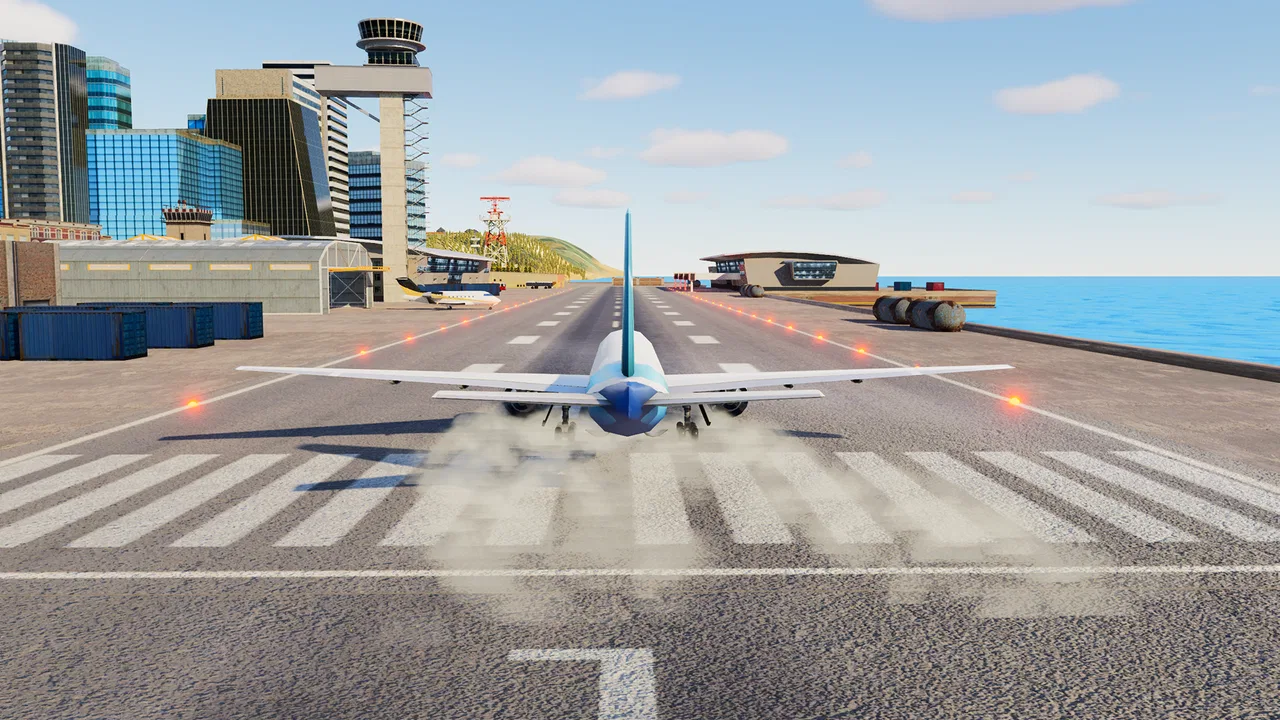
The first thing I noticed was how much the experience depends on visual understanding. A flight simulator can become confusing when controls, scenery, objectives, and camera movement compete for attention. Here, the basic appeal is easier to grasp: I am controlling an aircraft and trying to manage its movement through the environment. That makes it suitable for someone who wants to experiment before committing to a more demanding simulator.
I found the best way to approach it was to treat the opening sessions as orientation rather than performance tests. Instead of trying to fly perfectly, I paid attention to how the aircraft responds to small changes. This is useful for younger players and newcomers because it turns the game into a gradual discovery process. It also helps players who may need extra time to interpret on-screen information, since rushing tends to make every control feel more difficult.
The game’s presentation is more useful when I focus on one task at a time. Watching the aircraft’s position, checking where I want to go, and making a small adjustment is more manageable than constantly switching attention between every visible element. That is a practical habit for anyone playing on a smaller screen. A larger device can make the scene easier to inspect, but the game remains designed for mobile play rather than a full desktop cockpit.
Navigation is also affected by the difference between looking around and actually controlling the aircraft. When I changed my view or concentrated too much on scenery, I could lose awareness of the aircraft’s direction. My advice is to establish a stable viewpoint before attempting a turn or other maneuver. This is not a flashy trick, but it reduces unnecessary corrections and makes the controls feel less unpredictable.
For a child, a first-time player, or someone who prefers straightforward interfaces, that learning curve is reasonable. The game does not require the same mental preparation as a complex flight simulator. Still, “easy to begin” does not mean “effortless to master.” The aircraft can drift away from the intended path when I make large or hurried inputs, so patience matters more than fast reactions.
Why the simple approach works for casual players
Airplane games often fall into two groups: highly technical simulators that reproduce procedures in detail, and arcade-style experiences that make flying almost automatic. This title sits closer to the approachable middle. I get enough control to feel involved, but I am not expected to manage the full workload of a real pilot. That balance is the main reason I would recommend it to someone who wants a short, relaxing flying session.
Compared with a dedicated simulator, the advantage is reduced cognitive load. I can play without preparing charts, learning aircraft systems, or remembering a long sequence of commands. Compared with a purely arcade flying game, the advantage is that my choices still matter. Smooth inputs and attention to direction produce better results than simply tapping at random.
That middle ground also affects who should skip it. If you want accurate procedures, detailed instrument work, or a strong sense of operating a real aircraft, I would choose a more specialized alternative. If you want a game that lets you take off, explore, and practice control without a steep technical wall, this one makes more sense.
Motor and sensory considerations
Touch-based flight controls can be comfortable for some players and tiring for others. I found that the game rewards controlled, repeatable gestures rather than frantic movement. That is encouraging for players who can use touch controls but prefer not to perform rapid sequences. A useful approach is to keep movements small and deliberate, giving the aircraft time to respond before making another correction.
Players with limited fine-motor precision may find large corrections easier than tiny ones, but large corrections can also make the aircraft harder to stabilize. That creates a genuine accessibility trade-off: reducing the number of inputs may simplify the physical task, while sacrificing accuracy. I would suggest playing in short attempts, using a comfortable grip, and resting the hands before tension turns a manageable session into a frustrating one.
For players with tremors or inconsistent touch accuracy, the most forgiving strategy is to avoid chasing every small change in direction. I had better results when I accepted a slightly imperfect path and corrected it gradually. In a flying game, overcorrection is often more damaging than a small deviation. This is one of the less obvious lessons the game offers, and it can make the experience feel calmer for players who do not enjoy rapid, precision-heavy controls.
Sensory comfort is another consideration. Flying through a moving environment can be engaging, but continuous motion may not suit everyone. I recommend testing the game during a short session first, especially if camera movement or changing scenery tends to cause discomfort. Keeping the device steady, sitting at a comfortable distance, and avoiding long sessions can make the experience easier to tolerate. These are practical habits rather than promises that the game will suit every sensory profile.
Visual clarity depends heavily on the player’s device, screen size, brightness, and personal vision needs. On a compact phone, distant scenery and small interface elements can demand more concentration than they would on a larger display. I would not choose this game for someone who needs very large text or highly configurable visual presentation unless they can comfortably use the device’s own display adjustments. The game is approachable, but that does not automatically mean every visual element will be equally easy for every player to read.
Sound can also influence comfort, even when it is not central to the gameplay. Players who are sensitive to audio should begin with the device volume at a comfortable level and adjust from there. Those who prefer a quieter experience may enjoy playing with reduced sound, provided they remain comfortable relying on the visual feedback. I found that the core flying idea is understandable without treating audio as the only way to know what is happening.
Situational access for everyday play
This is the kind of game I would use during a short break, while waiting for an appointment, or when I want something more active than a puzzle but less demanding than a long strategy session. A realistic example is a ten-minute evening session: I pick up the phone, practice keeping the aircraft on course, and stop before the controls become tiring. The game works well in that context because I do not need to build a large story campaign in my head before enjoying it.
It is also a reasonable choice for shared play in a family setting. An adult can explain the basic idea quickly, then let a younger player experiment. Because the content rating is Everyone, families looking for a broadly suitable flying game may find the presentation reassuring. That rating should not be confused with a guarantee that every child will find the controls easy; younger players may still need help understanding direction, camera movement, and the consequences of sudden inputs.
The free price makes trying it straightforward, but the presence of in-app purchases deserves attention. Items range from around four dollars to nearly one hundred dollars each, so I would approach purchases carefully, particularly on a shared device. The game can be sampled without paying, yet families should use their normal device-level purchase protections and agree on spending rules before handing it to a child.
Its broad reach is reflected in a 4.7 average from over one hundred thousand ratings, while more than five million installs show that it has found a substantial mobile audience. Those figures suggest strong general appeal, but they do not remove the need to judge the game against personal needs. Popularity cannot tell me whether the controls are comfortable for a particular player, whether the visual motion is tolerable, or whether the level of realism is enough.
The game is available for devices running Android 6.0 or later, which covers a wide range of older and newer hardware. Even so, compatibility is not the same as comfort. A device that technically runs the game may have a smaller screen, older touch response, or less convenient handling than a newer model. I would test it on the actual device intended for play rather than assuming that the minimum operating system tells the whole story.
Remaining barriers and important trade-offs
The largest barrier is the lack of a genuinely hands-off way to fly. The player needs to interact with the device, interpret movement, and make corrections. That is central to the game, but it limits suitability for people who cannot comfortably perform touch input. I would not recommend it as an accessible game solely because its concept is simple; the physical act of controlling an aircraft remains essential.
Another barrier is the difference between casual simulation and serious simulation. The name may attract aviation enthusiasts expecting a detailed cockpit experience. My time with it suggested a more relaxed interpretation of flight. That is not a flaw when the goal is easy entertainment, but it is a mismatch for users who want realistic checklists, authentic aircraft management, or structured training. Choosing the game for those reasons would likely lead to disappointment.
Attention demands can also increase when the player tries to explore while flying. Looking at the surroundings is part of the enjoyment, but it competes with maintaining control. Players with attention-related challenges may prefer to set one goal per session: keep a steady course, learn a maneuver, or simply explore. Breaking the experience into single objectives makes it less mentally crowded than trying to do everything at once.
The current version is 1.33, and I would keep the game updated through the normal app store process when possible. Updates can matter for compatibility and general stability, but I would still judge the experience by how it behaves on the specific phone or tablet in use. Mobile performance varies, and a game that feels smooth on one device may feel less comfortable on another because of screen size, touch response, or battery condition.
Players who dislike monetization should also think about how they want to approach the free download. I personally treat the no-cost entry as a chance to decide whether the flying itself is enjoyable before considering anything optional. If the basic controls do not feel right, spending money will not solve that underlying problem. This is especially important for parents, since the highest-priced individual items approach one hundred dollars.
Who will enjoy it, and who should choose something else
I would recommend Airplane Pro to casual players who like vehicles, children who enjoy trying out flight themes, and adults who want a simple simulation for short sessions. It is particularly suitable for someone who finds professional simulators intimidating but still wants more involvement than a game that flies automatically. The free entry point makes experimentation easy, while the Everyone rating supports its family-friendly positioning.
I would be more cautious about recommending it to players with strong motion sensitivity, significant difficulty with touch controls, or a need for large, highly customizable interface elements. I would also steer experienced virtual pilots toward a deeper simulator. A more technical alternative is better when realism, aircraft systems, and procedural accuracy are the main reasons for playing.
There is a useful middle audience here: people who want to practice patience and spatial awareness without turning the hobby into study. I found that the game rewards observing the aircraft, making measured corrections, and accepting that a smooth flight is more satisfying than a dramatic one. That makes it a better fit for calm experimentation than for players seeking constant action.
My inclusive verdict after playing
Airplane Pro: Flight Simulator succeeds because it makes the idea of flying understandable without demanding specialist knowledge. Game Pickle has positioned it as a mobile simulation that can welcome newcomers, and my experience supports that broad purpose. The controls still require attention and physical interaction, but the learning process is approachable when I play slowly and focus on one task at a time.
Its accessibility is therefore practical rather than comprehensive. The game can work well across different ages and casual contexts, yet players with motor, visual, or sensory needs may encounter barriers that depend on the device and their personal comfort. I appreciate that the basic concept does not require a long tutorial or technical background, but I would not describe it as suitable for every ability without testing the actual controls and motion firsthand.
The strongest way to enjoy it is to set modest expectations: use it as a light flying game, not as a professional simulator. Keep sessions short if touch control becomes tiring, reduce visual or audio discomfort through the device settings where possible, and establish purchase boundaries before sharing it with children. Those steps do more to improve the experience than chasing perfect landings.
With over two thousand reviews and a large player base, it is clearly a well-received choice in its space, but the final decision comes down to the kind of access and realism you need. If you want an easy-to-start flying game that leaves room to learn at your own pace, I think it is worth trying for free. If you need advanced simulation depth or specialized accessibility controls, I would look elsewhere rather than expecting this lightweight mobile approach to cover every situation.
FAQs for Airplane Pro: Flight Simulator
01What is Airplane Pro: Flight Simulator?
Airplane Pro: Flight Simulator is a mobile flight simulation game focused on piloting aircraft through different flying scenarios. It is designed for players who enjoy takeoffs, landings, navigation, and completing aviation-related missions. The experience combines accessible controls with simulation-style elements, making it suitable for casual players while still offering challenges for users who want to improve their flying technique.
02Is Airplane Pro: Flight Simulator suitable for beginners?
Yes, the game is generally approachable for beginners, especially if they are new to flight simulators. The controls may take a little practice because players must manage direction, altitude, speed, and landing carefully. Starting with easier missions and becoming familiar with the interface is recommended. More experienced players can gradually increase the challenge by attempting difficult routes and precision-based objectives.
03Does Airplane Pro: Flight Simulator require an internet connection?
The connection requirements can depend on the version installed and the specific features being used. Basic gameplay may be available offline in some circumstances, but advertisements, online services, updates, cloud features, or additional content may require an active internet connection. Before traveling or playing without mobile data, it is best to launch the game once online and check which modes remain accessible offline.
04Is Airplane Pro: Flight Simulator free to download and play?
Airplane Pro: Flight Simulator can typically be downloaded without an upfront purchase, but availability of in-app purchases and advertising may vary according to the platform and region. Optional payments may be used for extra content, upgrades, or removing advertisements. Players should review the store listing carefully and check the device’s purchase settings, particularly if children will be using the application.
05What devices are compatible with Airplane Pro: Flight Simulator?
Compatibility depends on the operating system, device model, and minimum requirements specified on the official Google Play or App Store listing. Because flight games can use considerable graphics and processing resources, newer phones and tablets usually provide smoother performance and shorter loading times. Users should verify the required operating-system version, available storage, and permissions before downloading to avoid installation or performance problems.
Pros
- Realistic flight controls offer a satisfying challenge for simulator fans.
- A wide range of aircraft keeps gameplay varied over time.
- Multiple camera views improve cockpit awareness and landing precision.
- Detailed airports and environments make flights feel more immersive.
- Offline play is useful when traveling without a reliable internet connection.
Cons
- The learning curve may frustrate players unfamiliar with flight simulators.
- Some aircraft or features may require in-app purchases to unlock.
- Long flights can feel repetitive without more varied objectives.
- Touch controls can be awkward on smaller phone screens.
- Performance may drop on older devices during detailed scenes.

Airplane Pro: Flight Simulator
Gallery